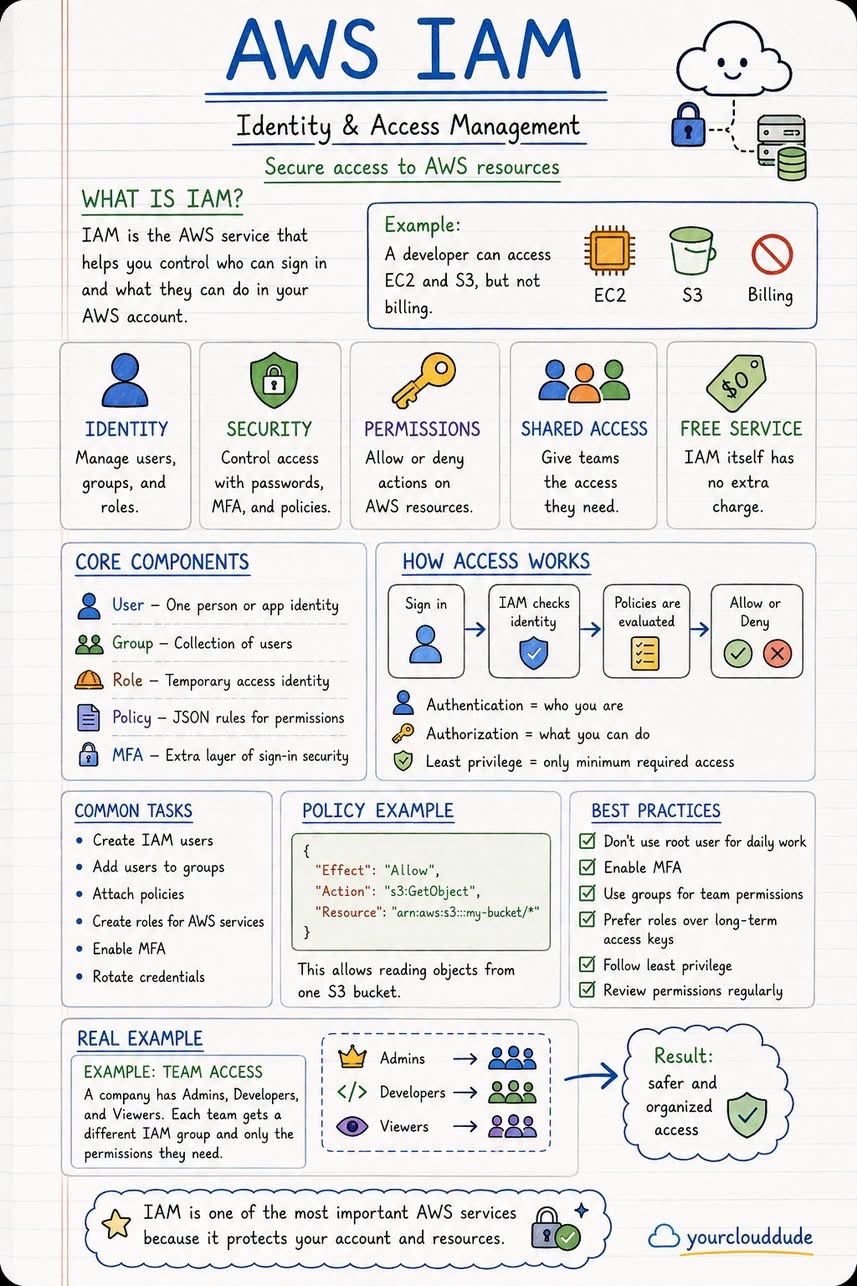
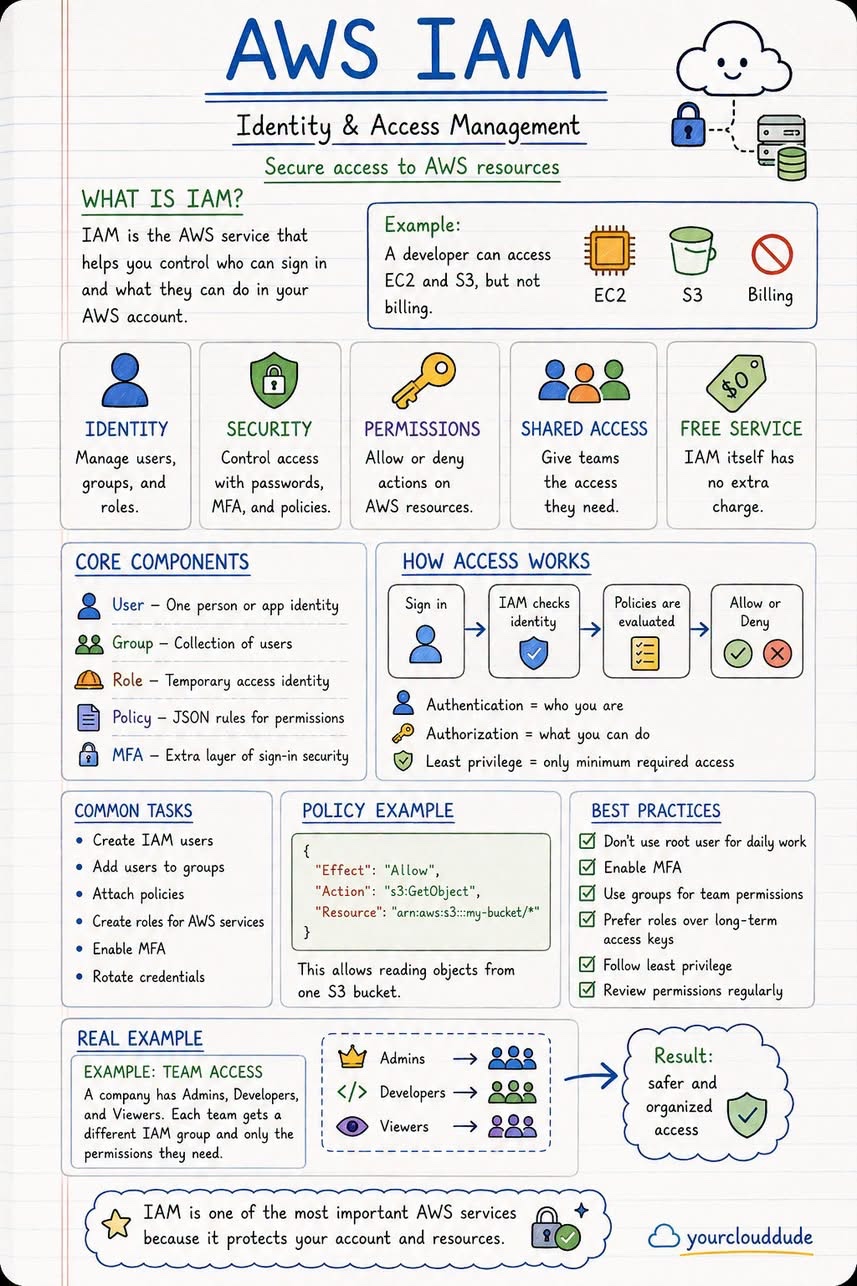
The AWS cheatsheet is a valuable resource for anyone looking to learn about Amazon Web Services. It provides a concise and visual summary of 5 key services, including EC2, S3, RDS, VPC, and IAM. Each section of the cheatsheet explains the concept, main components, how it works, common tasks, real-world examples, and best practices to keep in mind.
Introduction to AWS Services
The AWS cheatsheet covers a range of services that are essential for building and managing applications in the cloud. These services include:
- EC2: Virtual servers in the cloud
- S3: Object storage for files and data
- RDS: Managed relational databases
- VPC: Virtual private networks
- IAM: Identity and access management
Understanding EC2
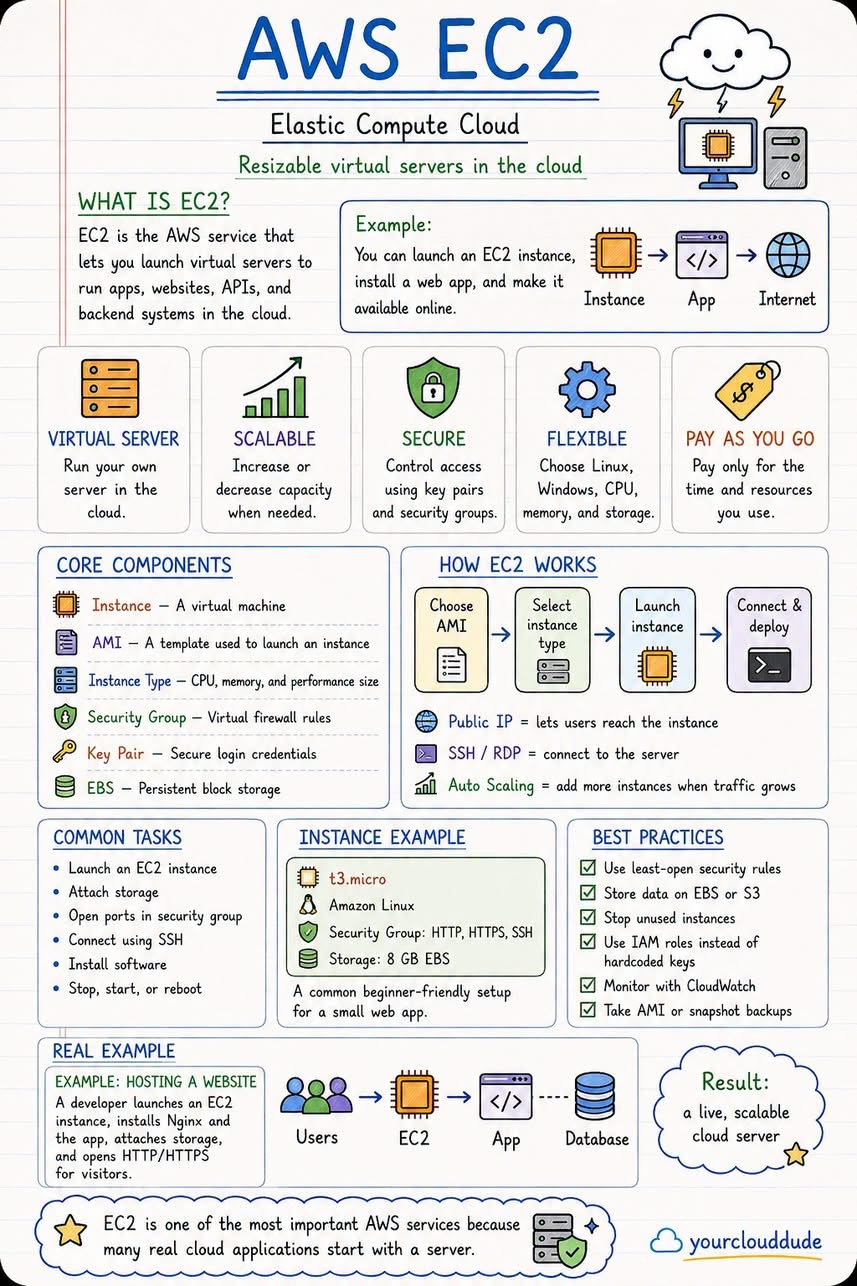
EC2, or Elastic Compute Cloud, is a service that provides virtual servers in the cloud. With EC2, you can create and manage your own virtual machines, choosing from a variety of operating systems and instance types. This allows you to scale your applications up or down as needed, and only pay for the resources you use.
Key Features of EC2
Some key features of EC2 include:
- Virtual servers with a range of operating systems
- Scalable instance types to match your workload
- Persistent storage options, including SSD and HDD
- Security groups to control access to your instances
Understanding S3
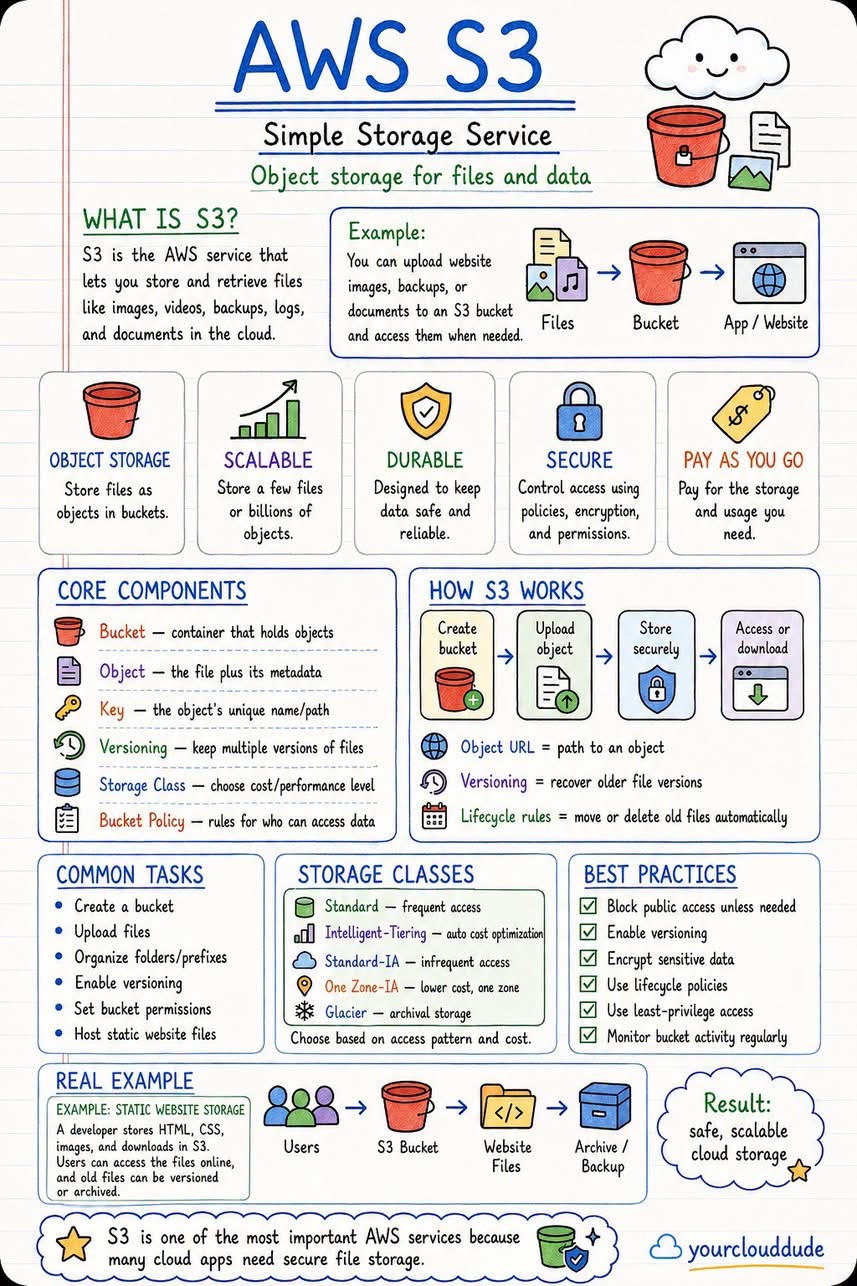
S3, or Simple Storage Service, is a service that provides object storage for files and data. With S3, you can store and serve large amounts of data, including videos, images, and other files. This makes it an ideal solution for applications that require large amounts of storage, such as media streaming and data analytics.
Key Features of S3
Some key features of S3 include:
- Object storage for files and data
- Scalable storage options to match your workload
- Data durability and availability, with automatic replication
- Security and access controls, including bucket policies and ACLs
Understanding RDS
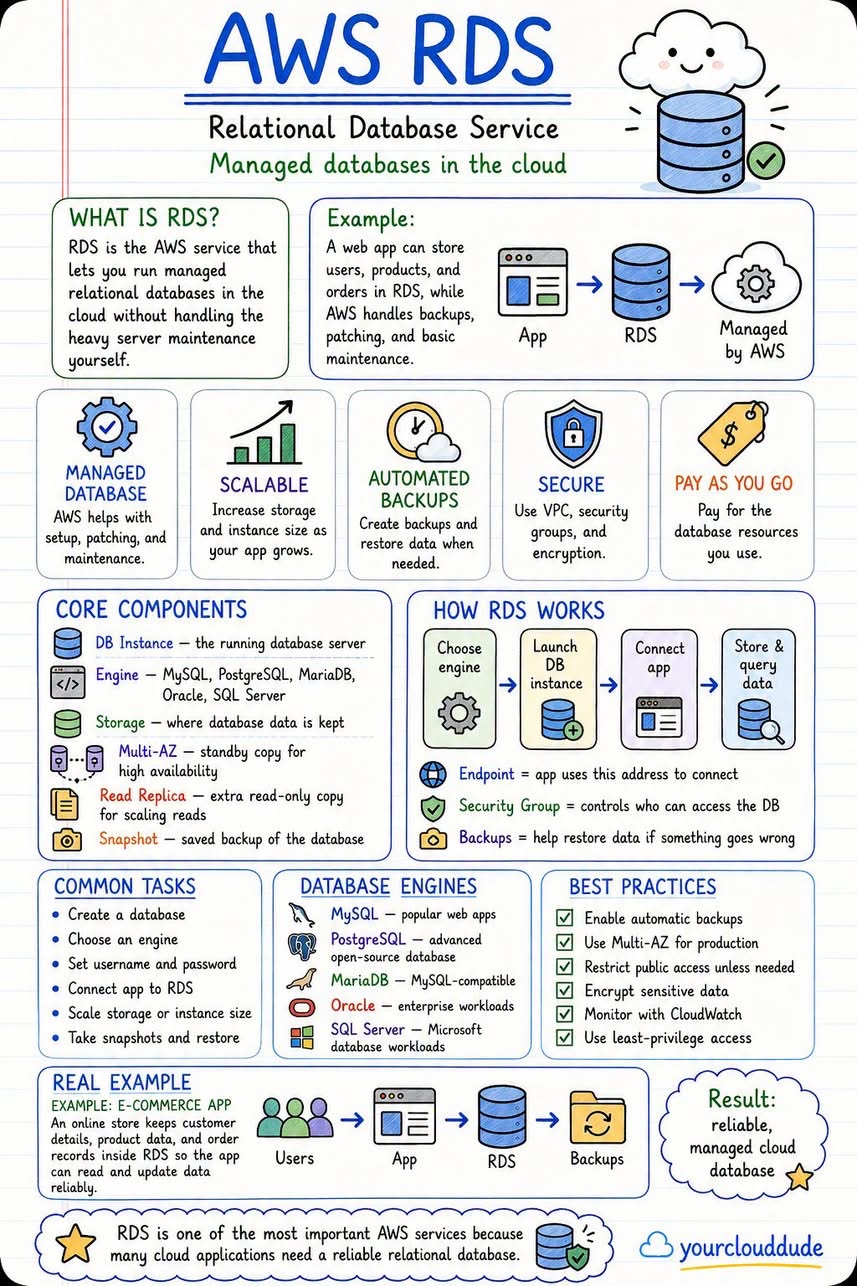
RDS, or Relational Database Service, is a service that provides managed relational databases. With RDS, you can create and manage your own databases, choosing from a variety of database engines, including MySQL, PostgreSQL, and Oracle. This allows you to focus on developing your applications, rather than managing your databases.
Key Features of RDS
Some key features of RDS include:
- Managed relational databases, with automated backups and patching
- Support for a range of database engines
- Scalable instance types to match your workload
- Security and access controls, including VPC integration and IAM authentication
Understanding VPC
VPC, or Virtual Private Cloud, is a service that provides virtual private networks. With VPC, you can create and manage your own virtual networks, choosing from a range of IP address ranges and subnet configurations. This allows you to isolate your applications and data from the rest of the cloud, and control access to your resources.
Key Features of VPC
Some key features of VPC include:
- Virtual private networks, with customizable IP address ranges
- Scalable subnet configurations to match your workload
- Security groups to control access to your resources
- Integration with other AWS services, including EC2 and RDS
Understanding IAM
IAM, or Identity and Access Management, is a service that provides identity and access management. With IAM, you can create and manage your own users, groups, and roles, and control access to your resources. This allows you to secure your applications and data, and ensure that only authorized users have access.
Key Features of IAM
Some key features of IAM include:
- Identity and access management, with support for users, groups, and roles
- Scalable access controls, with customizable policies and permissions
- Integration with other AWS services, including EC2, S3, and RDS
- Security and compliance, with support for auditing and logging
How AWS Cheatsheet Works
AWS Cheatsheet becomes clearer when readers can connect the high-level idea to the underlying workflow. A strong explanation should show the path from input data to useful output, including how information is represented, processed, and evaluated.
For technical readers, the most useful details are the steps that influence quality: data preparation, model architecture, training signals, inference behavior, and feedback loops. Explaining those steps gives the article more depth without forcing beginners into unnecessary jargon.
Key Components to Understand
Most modern AI systems combine several layers: data sources, model architecture, training infrastructure, evaluation methods, and deployment controls. Each layer affects accuracy, latency, cost, and reliability in production.
Readers should also understand the role of prompts, context windows, retrieval systems, monitoring, and human review. These components often decide whether a system is merely impressive in a demo or dependable enough for real workflows.
Limitations and Risks
No technical concept should be presented as magic. The article should explain where the approach can fail, including inaccurate outputs, outdated context, biased data, privacy concerns, unclear evaluation, and operational cost.
These limitations do not make the technology unusable, but they do shape how teams should apply it. Good implementation usually includes validation, logging, security review, and a plan for human oversight when decisions matter.
Practical Takeaways
- Start with the core concept before moving into architecture or implementation.
- Connect each technical detail to a practical use case or decision.
- Call out limitations clearly so readers know how to apply the idea responsibly.
Source Images
Conclusion
The AWS cheatsheet is a valuable resource for anyone looking to learn about Amazon Web Services. By providing a concise and visual summary of 5 key services, including EC2, S3, RDS, VPC, and IAM, it makes it easy to get started with AWS and understand the key concepts and services. Whether you're a developer, sysadmin, or IT professional, the AWS cheatsheet is an essential tool to have in your toolkit. For more information, see the @@N8NLINK0@@.