In the evolving landscape of AI-assisted development, understanding how to optimize Claude token usage is becoming as crucial as writing efficient code. Many developers might be "throwing money out the window" without realizing the subtle yet significant impact of session management on their Claude Code costs. The core insight is simple: using Claude Code isn't just about choosing the strongest model; it's fundamentally about how you manage your session.
For the same task, Claude might complete it in a few model calls, but it could also cost many times more just by reading too many files, retaining too much context, and repeating unnecessary actions. This article delves into the practical strategies for cost-effective AI coding, drawing from a detailed analysis of Claude's operational mechanics.
The True Cost of AI Coding: Beyond Model Choice
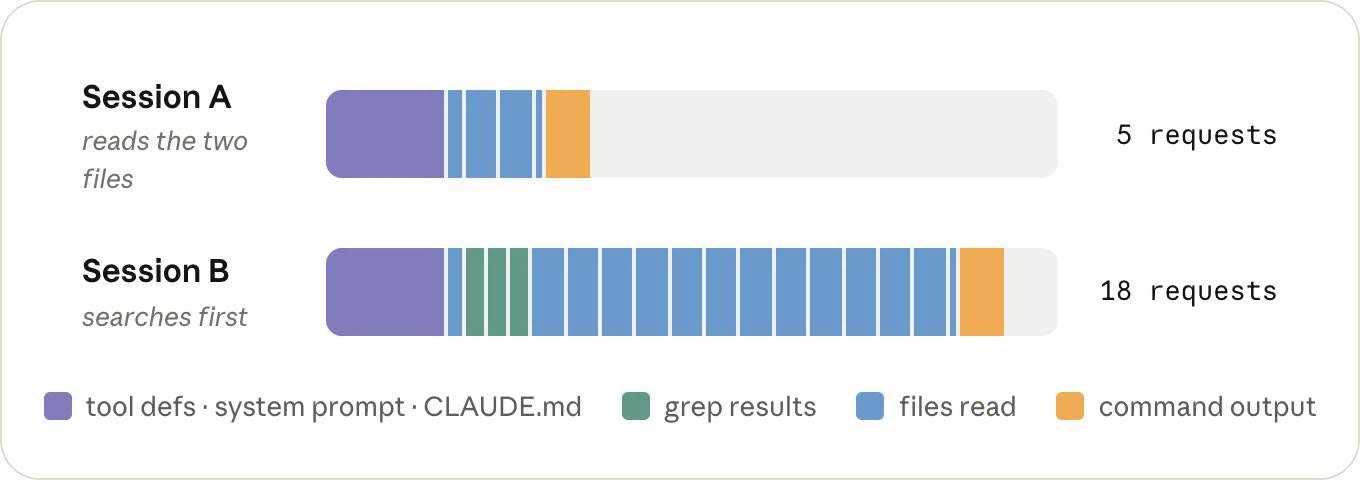
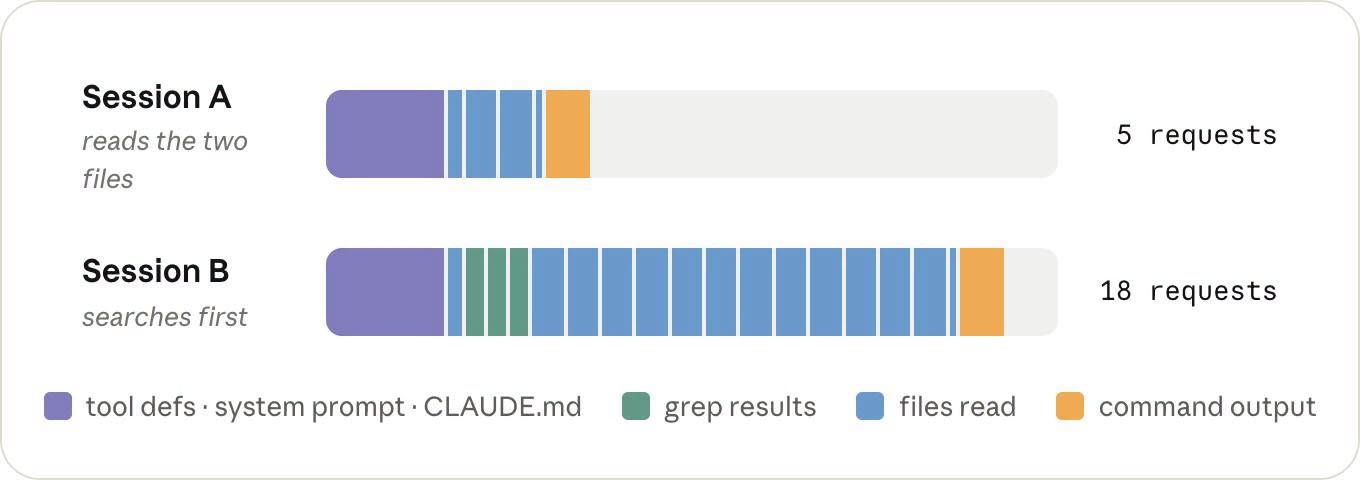
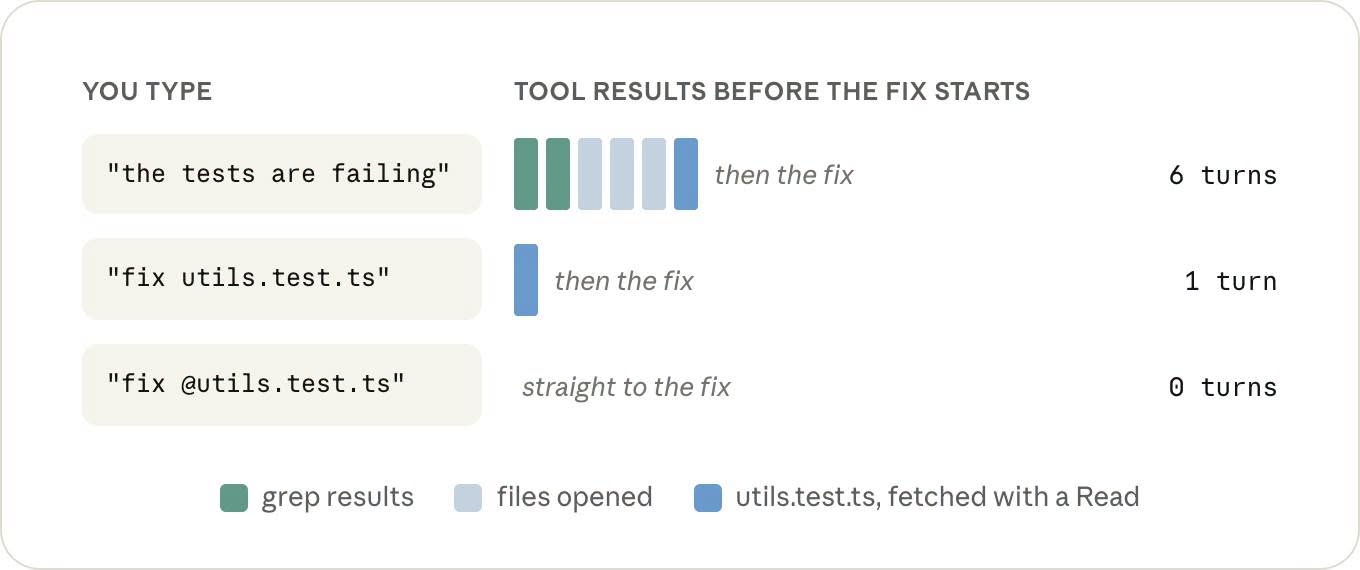
Why do identical tasks incur vastly different costs? Consider a scenario where you ask Claude to “Fix the failing test in `utils.test.ts`.” If Claude knows the exact file to modify, it can read the file, fix the code, run the test, and finish. However, if you merely state “tests are failing,” Claude must autonomously search for the failing tests, grep the repository, and read a series of files to diagnose the root cause. All these files and their contents, once read, persist within the session's context. Consequently, for the same bug, one approach might only need a few turns, while the other could process tens of thousands of tokens.
This illustrates that optimizing tokens isn't about forcing Claude to use the fewest tokens. What truly matters is whether those tokens genuinely serve the task at hand. You're essentially paying for the GPU computation behind each token.
Understanding Claude's Token Economy
Claude charges based on tokens, which directly reflects the underlying GPU computation. Three primary factors influence this cost:
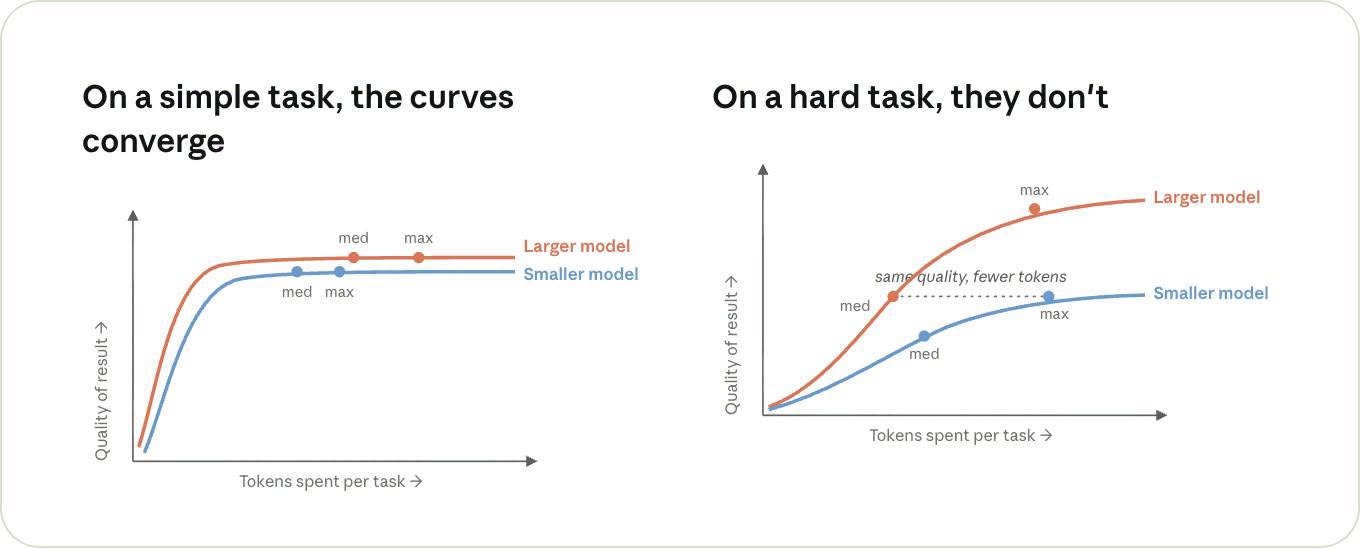
- Model Choice: Larger models consume more computation. Therefore, for difficult tasks, use a powerful model; for simple tasks, it's not always necessary to use the strongest model.
- Input/Output Volume: The number of tokens sent as input and received as output directly impacts cost.
- Context Caching: How effectively previous context is cached plays a significant role.
Specifically, output tokens are significantly more expensive than input tokens because the model has to generate each token individually. This includes "thinking tokens," meaning if you set a higher effort level, the model "thinks" more, incurring higher costs.
Leveraging Prompt Cache for Efficiency
Prompt caching is a critical concept for cost optimization. If Claude has just processed 10,000 tokens of context in a previous turn, in the next turn, it doesn't necessarily have to recompute everything from scratch. If the initial part of the request is identical, the server can retrieve that portion from cache. According to Anthropic, reading from cache costs only about 10% of the usual input price. Therefore, old context isn't always as expensive as new context.
However, you can inadvertently break the cache. For instance, changing `/model` or `/effort` in the medio of a long conversation can invalidate the cache. When this happens, Claude must prefill a large part of the conversation again. To avoid this, if you intend to use Opus with high effort, it's best to select these settings at the very beginning of the session, rather than switching after 30 turns.
Taming Session Bloat in Claude Code
This is where many Claude Code users might be overlooking significant costs. Every time Claude reads a file, executes a command, or receives tool output, that information is added to the conversation. Crucially, these additions do not automatically disappear; they persist in the context of subsequent turns. For example, if Claude runs a test and the terminal returns 400 lines of results, and this output isn't large enough for Claude Code to convert into a separate file, all 400 lines can remain in the context for future turns.
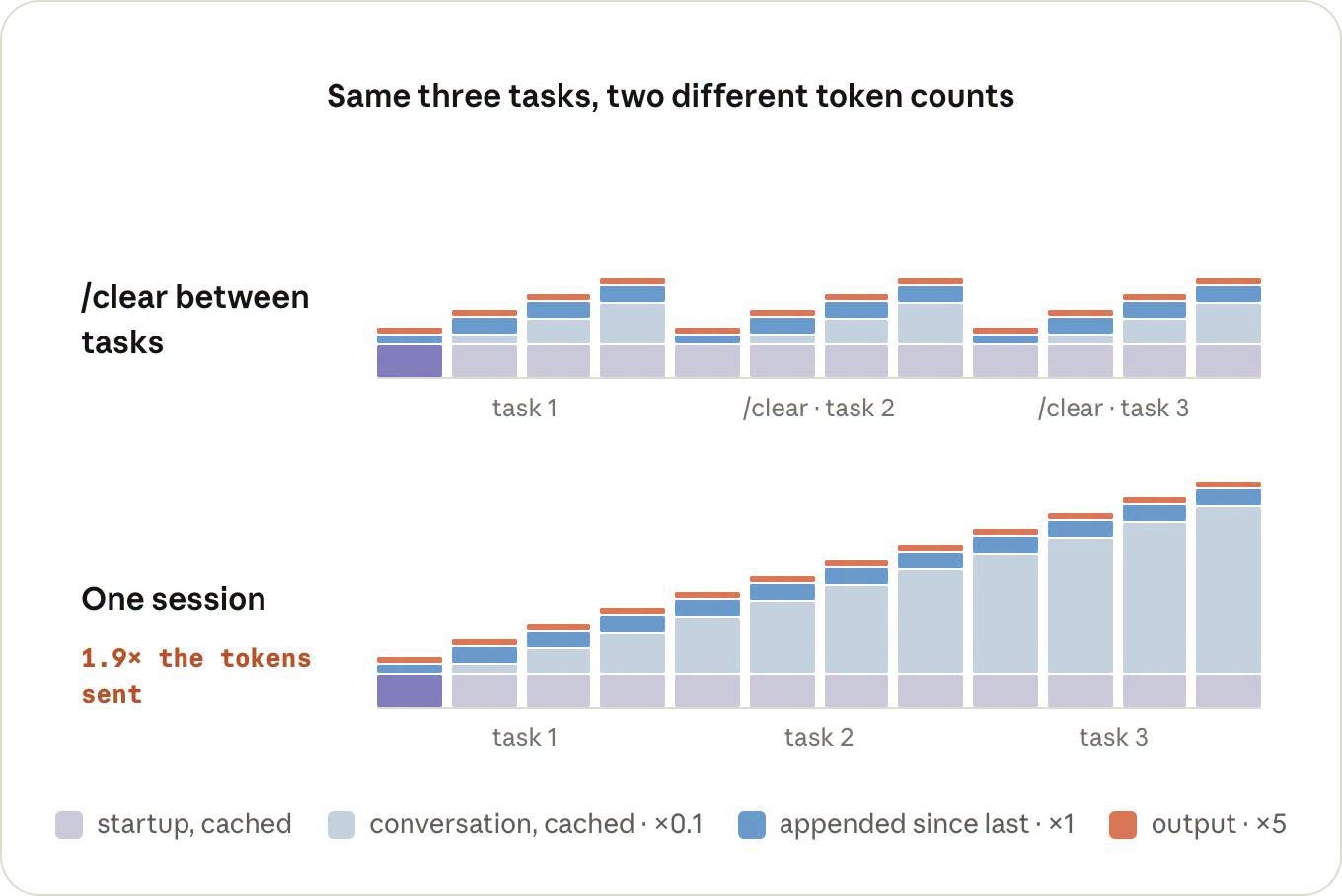
This is why a long session doesn't just get longer; it gets progressively heavier. By the 40th turn, Claude isn't just processing your new question; it also has to carry along everything that appeared in the previous 39 turns. Imagine you have a task that requires reading a log long 50,000 lines. If Claude processes this directly in the main session, the entire log reading process could inflate the main context dramatically.
Practical Commands for Context Control
Several commands can help manage context effectively:
- `/clear`: When transitioning to an entirely different task, use `/clear`. For example, if you debug authentication in the morning and switch to UI work in the afternoon, there's no reason for Claude to carry the entire authentication context into the UI task. A new task should mean a new session with a clean context. If you want to save the old session for later, `/rename` it first, then `/clear`.
- `/compact`: This command is for when you're still working on the same task but the conversation has become excessively long. Claude will summarize the conversation to reduce context. Be aware of a trade-off: compacting will make the old cache less perfectly matched. Therefore, if you're about to take a break, compacting before you leave is better than doing it hours later upon return.
- `/rewind`: If only the last few turns went off track and you want to discard them, `/rewind` can be more appropriate. It only prunes the end, preserving the earlier context.
- Targeted File Access: Instead of saying, “Fix the failing test,” if you know the file, say, “Fix the failing test in `utils.test.ts`.” Even better, use `@utils.test.ts`. When you use `@`, Claude Code directly injects the file into the request, bypassing the need for an additional `Read` call to find and read it.
- Manage Command Output: Terminal output can easily bloat context. If running tests yields hundreds of lines, all those lines can persist. Use flags to make commands return only what's truly necessary. For frequently run commands, consider documenting "quiet" execution methods in `CLAUDE.md`. For example, use a more concise reporter for tests to only return critical results.
- `/context`: Run `/context` in a new session to see what Claude is carrying by default: system prompt, tool definitions, `CLAUDE.md`, and other components loaded at session comenzar. If `CLAUDE.md` is too long, or you've enabled many MCPs (Managed Context Providers) that aren't relevant to the current task, you're burdening the model with unnecessary information. It's recommended to keep `CLAUDE.md` for general instructions and move workflow-specific instructions into skills, loading them only when needed. Unused MCPs can be disabled with `/mcp`.
The Power of Subagents and Separate Loops
- `/loop`: The `/loop` command isn't a background process that doesn't affect the session. Each loop execution creates a full turn within the current session. This means if the session already has extensive context, each loop iteration still carries that context along. If the cache has expired, there's an additional prefill cost. For long-running loops, it's advisable to open a separate session in another terminal and run the loop there, keeping it out of your main, context-heavy session.
- Subagents: Subagents offer an elegant solution for "noisy" tasks. Instead of letting Claude process a 50,000-line log directly in the main session, you can delegate this to a subagent. The subagent operates with its own context, analyzes the log, and ultimately returns only the conclusion to the main session. The extensive data it processes internally does not get injected into the main context. This pattern is highly effective: the main agent maintains critical context, while subagents handle the "noisy" work. While subagents have their own costs and might occasionally re-read information the main agent already knows, separating context is often worthwhile for tasks generating significant output.
Key Takeaways for Optimize Claude Token Usage
To effectively optimize Claude token usage and minimize costs:
- When starting a new task, use `/clear`.
- At the beginning of a session, select your model and effort level upfront; avoid changing them mid-conversation unless necessary.
- If you know the exact file to work on, use `@file` instead of making Claude search for it.
- For commands that produce excessive output, configure them to run "quietly."
- In a new session, run `/context` once to understand what Claude is carrying by default.
- If you're still on the same task but the context has grown too long, use `/compact`.
- If you're about to take a long break, compact before you leave to leverage caching.
- For tasks that generate a lot of output, consider offloading them to a subagent.
- If using `/loop`, it's best to run it in a separate session.
Source Images
Conclusion
The most profound insight isn't just about these commands; it's the realization that context has become a resource that developers must actively manage. In the past, writing code in an IDE incurred costs largely independent of whether you changed one line or a thousand. Now, with AI agents like Claude Code, every action involves inference. Claude reads files, executes commands, thinks, calls tools, processes results, and thinks again. Each turn accumulates context from previous interactions. Therefore, future proficient Claude Code users won't just be skilled prompt engineers; they will be adept managers of context, sessions, cache, models, and agents. The goal isn't to make the agent do as much as possible, but to design workflows where the agent only needs to think about what's truly essential.